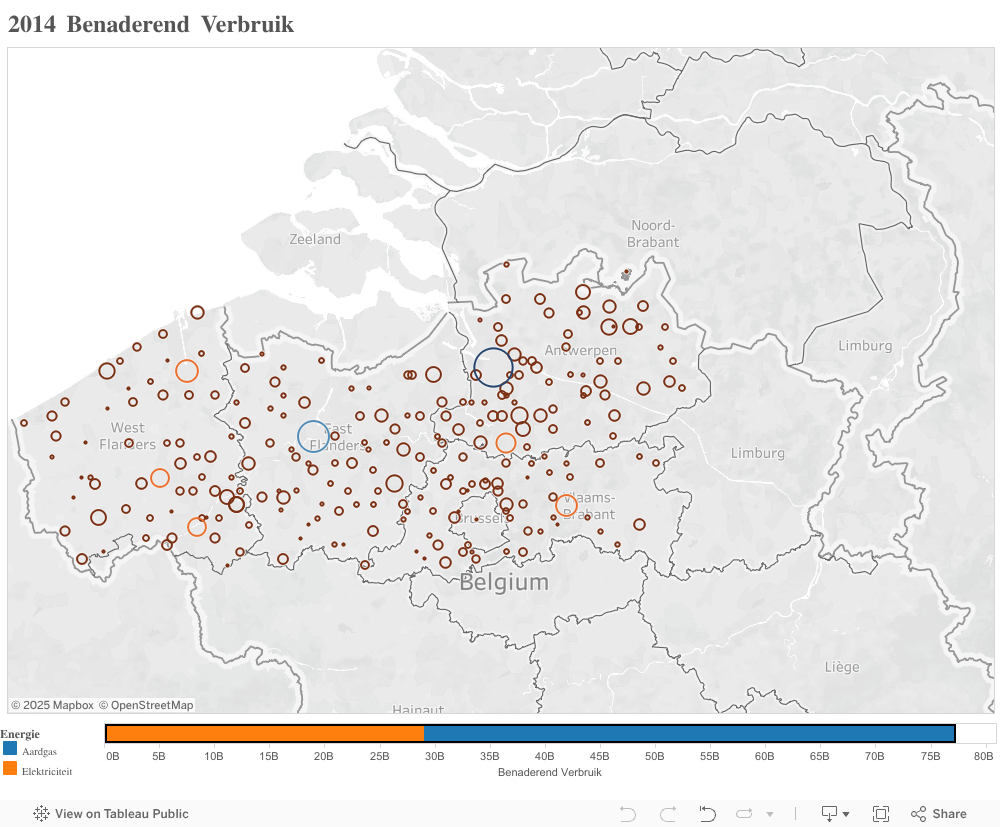
Data visualization and geo-reporting are hot topics nowadays in the BI and analytics world. They can bring significant value to an organization, if executed correctly. A lot of companies struggle with implementing geo-reporting, as automatically geo-coding addresses often poses a big challenge. To solve this there are basically 3 solutions:
- You purchase a GIS add-on / plugin solution, which is specific to your current BI solution
- You purchase a list with GIS coordinates of a regional level, for instance Belgian zipcodes. Vendors are offering such files per country
- With some creativity you include the googlemaps geocoding api in your data flow
In this blog I will explain how this automatic geo-coding of addresses can be created on data level, which afterwards can be used by a BI-tool of your choice. This is in my belief the best way forward. What’s more: the API also cleanses your address data, so if there is a misspelling/typo in the address data you will get a corrected version of it. You can find an example of this at the end of this blog.
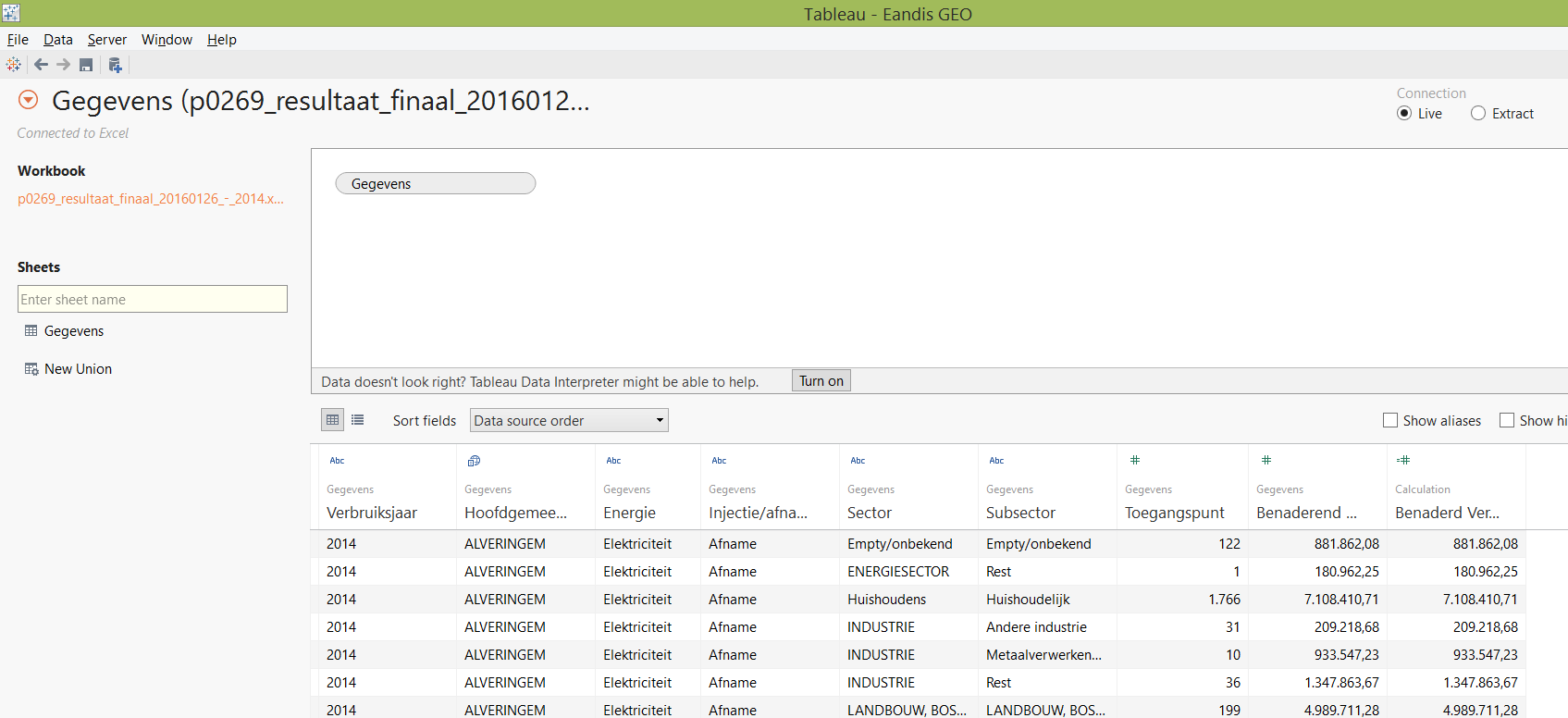
I’m using Tableau, a leading data visualization solution which offers me a very good integration with sources like AWS redshift. In the data represented below, you can find the town of “Alveringem” in the list. Tableau will not recognize this and will classify it as “Unknown”. The same behaviour is to be expected with other self-service BI tools like SAP Lumira or Spotfire. We will create a front-end independent solution that will solve this problem.
The realization of the encoding is done with python and the pandas library, this blog also illustrates how well the pandas library is suited to wrangle any data in a BI or big data landscape.
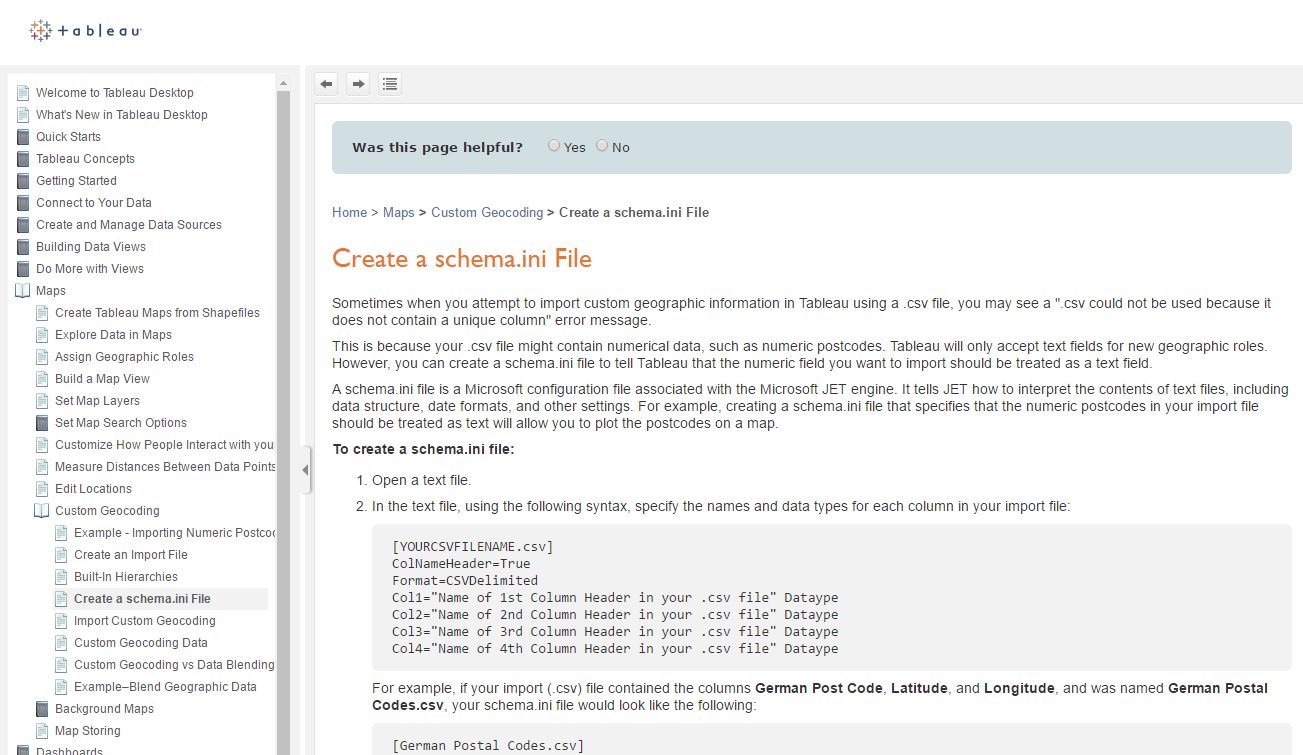
To solve this in Tableau you can refer to external provided geolocation information, you have to point to a directory. In this directory you have to include an ini file which describes your data structure. This is explained in the help of Tableau:
The data we want to encode is provided by Eandis under open data and represents energy consumption by locality. This can be found on: http://www.eandis.be/nl/open-data-over-de-energiemarkt Instead of filtering out all the localities from my “transactional data set”, I just take a more “master data” approach and take a list of all Belgian localities. An official list of Belgian postal codes can be found on: http://www.bpost.be/site/fr/residential/customerservice/search/postal_codes.html When the file is downloaded we just simplify the sheet names to for instance: BW instead of “Brabant Wallon”. If we take a closer look to this Excel file we have on every sheet:
- “Code postal” = the zipcode
- “Localité” = the town/city
- “Sous-commune” = the sub locality indicator
- “Rôle linguistique” = the linguistic role, we will not use this field but will add a new field
#1
import googlemaps
#import unicodedata
import pandas as pd

#2
#Local xls file with postal codes
#Rename the xls sheets
xls_file = pd.ExcelFile('C:\\Users\\thierry\\Documents\\DATA\\GEO coding BE\\zipcodes_prov_fr.xls')

#3
capitalizer = lambda x: x.upper()
[4] here you define your googlemaps API key, which you need to register, how to register and what’s the free quota is explained later
#4
#Replace with you API key
gmaps = googlemaps.Client(key='')
[5] to [15] We just make 1 dataframe of the different sheets and we add 2 extra columns: - sheet: with the original sheet name - lang: with the language which we want to use for the encoding
The api is able to encode in different languages, to illustrate if we would just encode the postal code 1000:
| Encoding language | City encoded result |
|---|---|
| EN | Brussels |
| NL | Brussel |
| FR | Bruxelles |
#5
table_all = xls_file.parse('BW')
table_all['sheet'] = 'BW'
table_all['lang'] = 'FR'
#15
table_sheet = xls_file.parse('OV')
table_sheet['sheet'] = 'OV'
table_sheet['lang'] = 'NL'
table_all = table_all.append(table_sheet,ignore_index=True)
There’s also a sheet with special postal codes, we will not encode them.
[16] We call the helper function to apply an uppercase to the column “Sous-commune”
#16
table_all['Sous-commune'] = table_all['Sous-commune'].map(capitalizer)
[17] We quickly verify the header of our dataframe
#17
table_all.head(n=5)
[18] And by using tail, we just can verify the last lines of the dataframe
#18
table_all.tail(n=5)
[21] Let’s build the geo_result_frame, to do so: - we iterate by using itertuples() over the table_all dataframe - next we verify if this is a sublocality, if this is the case we provide also the sublocality for the encoding, if not the postal code is sufficient - from there we call the get_city_geocode and we also pass the language we want to use for the encoding xls_row[7] - if the locality is not resulted from the encoding service, we just take it back from the input
#21
geo_result = []
for xls_row in table_all.itertuples():
    if str(xls_row[4]) == "OUI":
      city_be = (str(xls_row[1]), xls_row[2], 'Belgique')
    else:
      city_be = (str(xls_row[1]), 'Belgique')
    city_be = " ".join(city_be)
    print city_be
    geocoded = get_city_geocode(city_be,str(xls_row[7]))
    if isinstance(geocoded, dict):
      if not 'locality' in geocoded:
        geocoded['locality'] = xls_row[2]
      geo_result.append(geocoded)

geo_result_frame = pd.DataFrame(geo_result)
[19] The definition of the get_city_geocode function, we pass the encoding service an extra parameter with region =”BE” And we also verify the result we get is certainly located in Belgium
#19
def get_city_geocode(in_postal_city,in_language):
    try:
      geocode_result = gmaps.geocode(in_postal_city,language=in_language,region="BE")
      for address_components in geocode_result[0]['address_components']:
        if address_components['types'][0] == 'country' and address_components['short_name'] == 'BE':
          return get_geo_info(geocode_result)
          break
    except:
      print "  Exception"
[20] We take the elements in which we are interested in from the encoding service and build a new “flatten” dictionary of it: geo_result. This will be a line of the final dataframe / Excel file
#20
def get_geo_info(in_geocode_result):
  geo_result = {}
  for address_components in in_geocode_result[0]['address_components']:
    if address_components['types'][0] == 'country':
      geo_result['country'] = address_components['short_name']
    if address_components['types'][0] == 'postal_code':
      geo_result['postal_code'] = address_components['short_name']
    if address_components['types'][0] == 'locality':
      geo_result['locality'] = address_components['short_name']
    if address_components['types'][0] == 'political':
      geo_result['political'] = address_components['short_name']
    if address_components['types'][0] == 'administrative_area_level_1':
      geo_result['administrative_area_level_1'] = address_components['short_name']
    if address_components['types'][0] == 'administrative_area_level_2':
      geo_result['administrative_area_level_2'] = address_components['short_name']
    geo_result['place_id'] = in_geocode_result[0]['place_id']
    geo_result['formatted_address'] = in_geocode_result[0]['formatted_address']
    geo_result['lat'] = in_geocode_result[0]['geometry']['location']['lat']
    geo_result['lng'] = in_geocode_result[0]['geometry']['location']['lng']
  return geo_result
#    print geo_result
[5’] to [8’] small example from another notebook to illustrate the result structure
#5'
geocode_result = gmaps.geocode('5580 Lessive Belgique',language="FR",region="BE")
#6'
type(geocode_result)
len(geocode_result)
#7'
print geocode_result[0]
'''
{u'geometry': {u'location': {u'lat': 50.13921, u'lng': 5.14662}, u'viewport': {u'northeast': {u'lat': 50.1463609, u'lng': 5.1626274}, u'southwest': {u'lat': 50.132058, u'lng': 5.1306126}}, u'location_type': u'APPROXIMATE'}, u'address_components': [{u'long_name': u'Lessive', u'types': [u'locality', u'political'], u'short_name': u'Lessive'},{u'long_name': u'Namur', u'types': [u'administrative_area_level_2', u'political'], u'short_name': u'NA'}, {u'long_name': u'R\xe9gion wallonne', u'types': [u'administrative_area_level_1', u'political'], u'short_name': u'R\xe9gion wallonne'}, {u'long_name': u'Belgique', u'types': [u'country', u'political'], u'short_name': u'BE'}, {u'long_name': u'5580', u'types': [u'postal_code'], u'short_name': u'5580'}], u'place_id': u'ChIJ4S8RLMXOwUcRV2qRVQrQUZw', u'formatted_address': u'5580 Lessive, Belgique', u'types': [u'locality', u'political']}
'''
#8'
print geocode_result[0]['types']
print str(geocode_result[0]['geometry']['location']['lat']) + " " + str(geocode_result[0]['geometry']['location']['lng'])
for address_components in geocode_result[0]['address_components']:
    print address_components

#[u'locality', u'political']
#50.13921 5.14662
#{u'long_name': u'Lessive', u'types': [u'locality', u'political'], u'short_name': u'Lessive'}
#{u'long_name': u'Namur', u'types': [u'administrative_area_level_2', u'political'], u'short_name': u'NA'}
#{u'long_name': u'R\xe9gion wallonne', u'types': [u'administrative_area_level_1', u'political'], u'short_name': u'R\xe9gion wallonne'}
#{u'long_name': u'Belgique', u'types': [u'country', u'political'], u'short_name': u'BE'}
#{u'long_name': u'5580', u'types': [u'postal_code'], u'short_name': u'5580'}
[22] We just can save the dataframe to a new Excel file
#22
#Save the result to local file
writer = pd.ExcelWriter('C:\\Users\\thierry\\Documents\\DATA\\GEO coding BE\\zipcodes_prov_fr_ALL.xlsx')
geo_result_frame.to_excel(writer,'ALL')
writer.save()
For those that just want to have the Excel file, this can be obtained by e-mail.
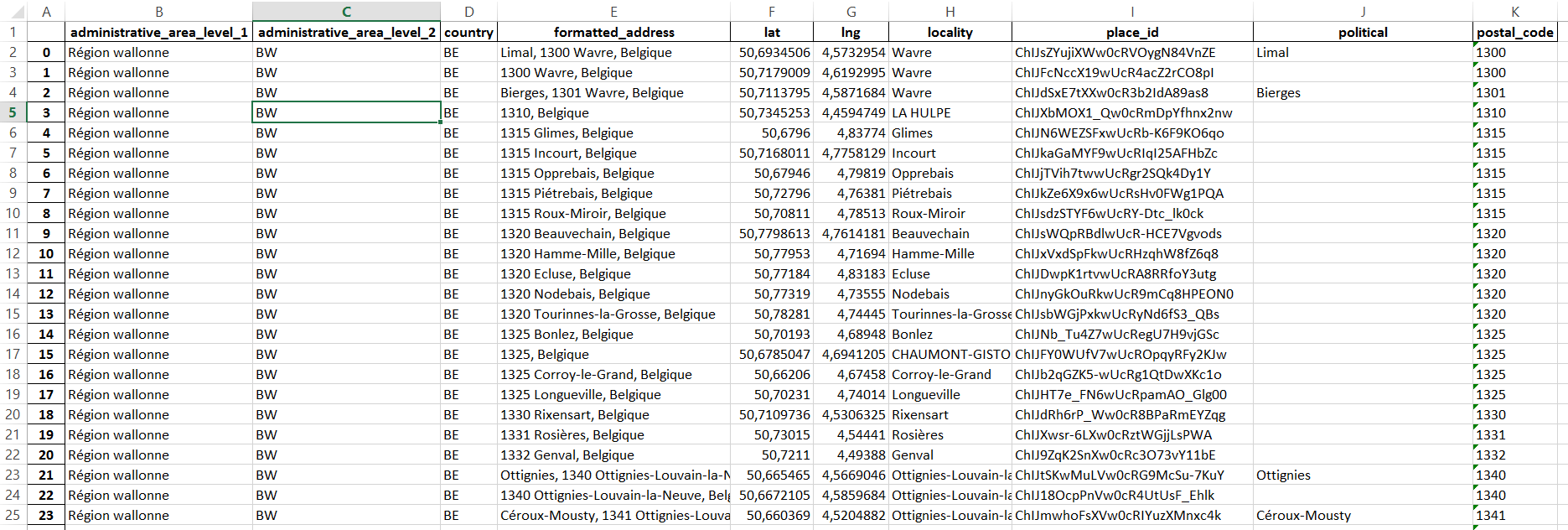
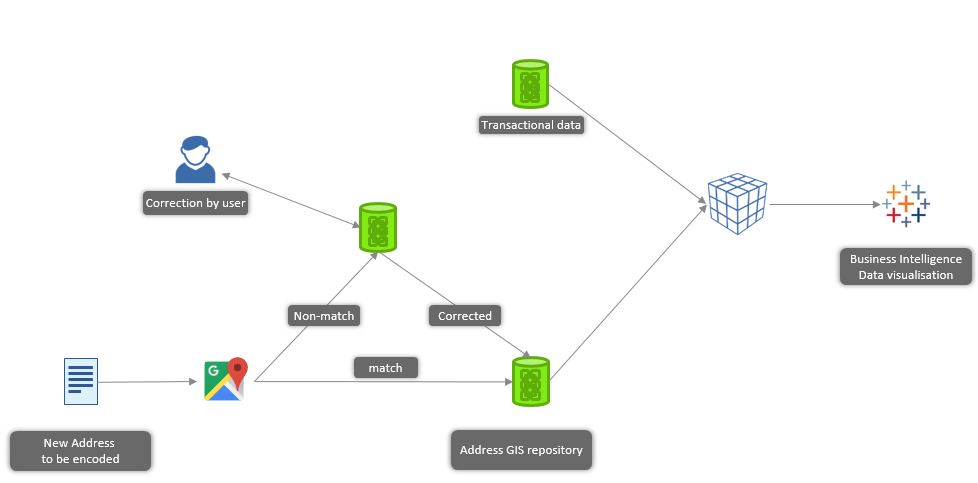
That’s it, we just encoded all the localities of Belgium at “data level” and it’s ready to be used by Tableau. In a more industrialized landscape this encoding service would be a part of your ETL flow. Represented in a small diagram:
How to register you google API key
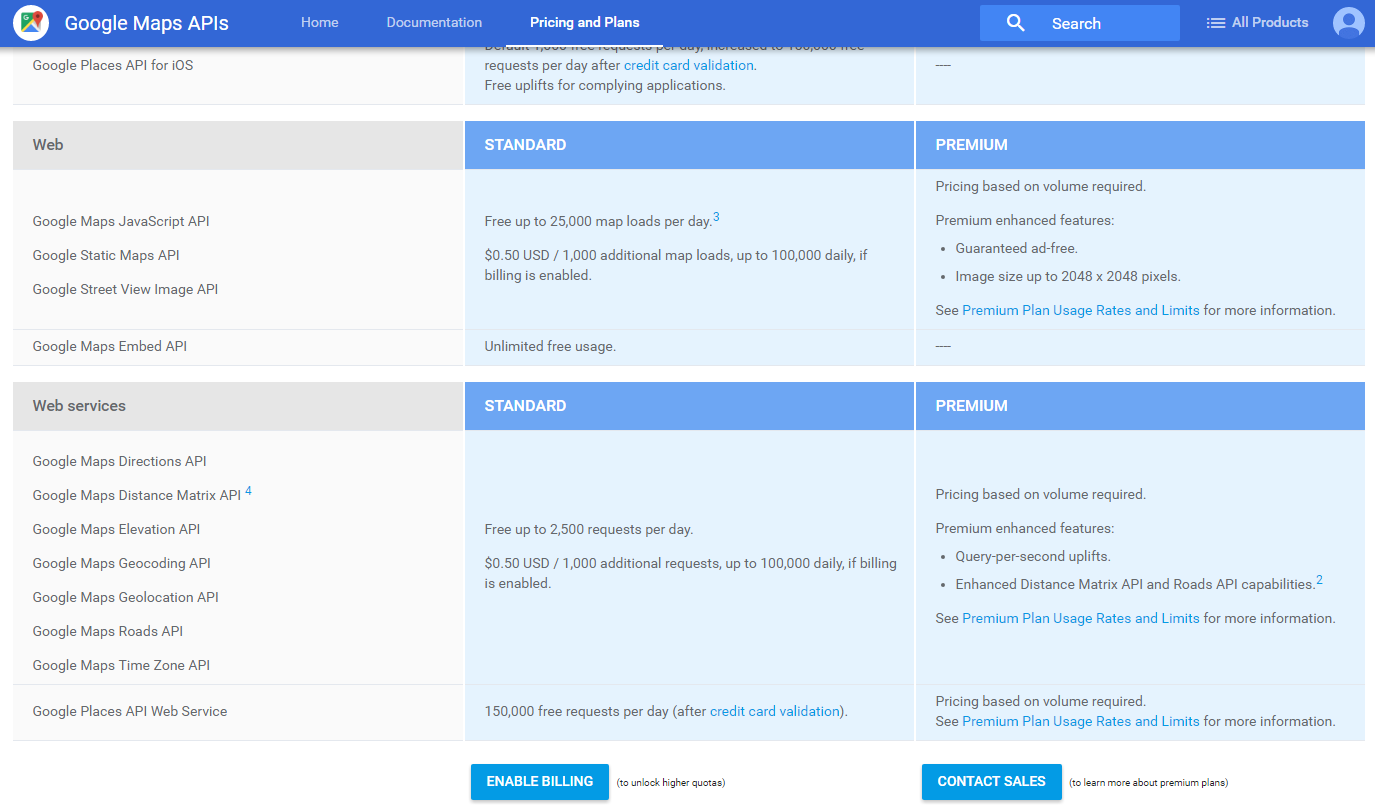
https://console.developers.google.com Like indicated below, the number of free request by day is limited to 2500 requests. At the opening of your account you get 300 USD credit, this allows you to encode a couple of addresses. Furthermore the pricing of the API is very low, it only costs 0,5 USD to encode 1000 addresses.
Address cleansing, from a customer demo we recently did
[6] we just define a couple of variables, note in addr2 we just skip the last two characters of the street name
#6 Geocoding an address
addr1 = '4 rue Lou Hemmer, L-1748 Luxembourg, Grand Duchy of Luxembourg' # A partial match
addr1c = '4 Rue Lou Hemmer, 1748 Findel, Luxembourg' # A complete match
addr2 = '4 rue Lou Hemm, L-1748 Luxembourg, Grand Duchy of Luxembourg' # A partial match
geocode_result = gmaps.geocode(addr2)
[9] We see it’s a partial match on street address, and the formatted address is “Rue Lou Hemmer”
#9
print "lat Lng: " + str(geocode_result[0]['geometry']['location']['lat']) + " " + str(geocode_result[0]['geometry']['location']['lng'])
print "Formatted address: " + geocode_result[0]['formatted_address']
print "Place id: " + geocode_result[0]['place_id']
if 'partial_match' in geocode_result[0]:
    print "A partial match for: " + geocode_result[0]['types'][0]
else:
    print "A complete match"

#lat Lng: 49.6329143 6.2091053
#Formatted address: 4 Rue Lou Hemmer, 1748 Findel, Luxembourg
#Place id: ChIJO6fO8LtFlUcRmZCiRpYuV9g
#A partial match for: street_address
The complete ipython notebook can be found here
More about the API can also be found on github https://github.com/googlemaps/google-maps-services-python/blob/master/README.md
Thierry